


.png)
We are excited to introduce several new features within our Projects Portal and Dashboard that will enhance your experience, streamline your workflows, and provide you with more control and flexibility. These enhancements will help you manage your projects more efficiently, allowing you to focus on the most important aspects of your work.
Request New Features
.gif)
You can now make feature requests directly from the ongoing projects menu, making it easier and faster to add additional tools to your projects. This streamlined process allows you to customize and enhance your project management experience to meet your specific needs. With just a few clicks, you can request:
- Lot Viewer: Gain insights into individual lots with detailed visualizations and critical data like cut/fill balance and spot elevations. Learn More
- Schedule: Keep track of project timelines and milestones with our advanced scheduling tool, using real project data. Learn More
- Panoramas: Add additional panoramic views of your project site for more comprehensive visual coverage. Learn More
- Flights: Schedule additional scans to capture more frequent site data and imagery.
Renew Your Contract

To ensure uninterrupted access to TraceAir's services, renew your contract before it expires. Our enhanced renewal process allows you to request renewals directly from the project menu, maintaining continuity and avoiding project disruptions.
Updated Flight Date Change Request
.gif)
We’ve enhanced the flight date change request option, making it more user-friendly. The updated design allows you to easily request changes to your flight dates, accommodating any necessary project schedule adjustments.
New Project Request
.gif)
You can now request a new project directly within Projects Portal, from both the Ongoing Projects and Project Setup pages, and also from the Dashboard. Simply select “Add Project” and a multi-step form will guide you through providing the project information, files, and choosing the plan and add-ons you need.
Coordinate Reference System Request Update
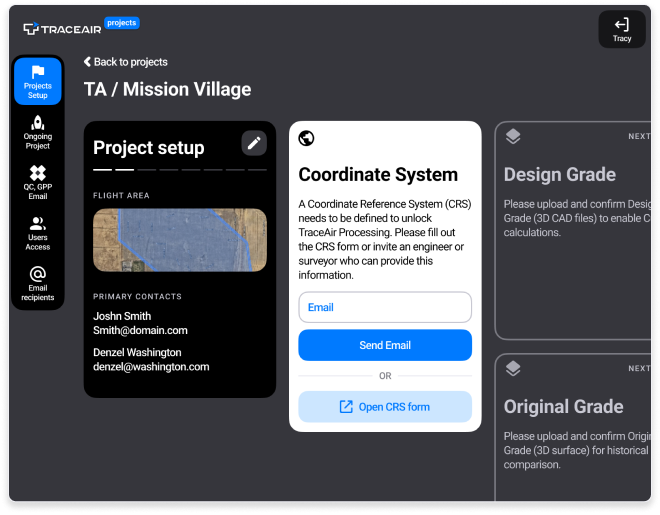
The new Coordinate Reference System (CRS) feature within the onboarding wizard accelerates project setup. Simply enter the email address of your surveyor or engineer, and TraceAir will send an email requesting the necessary files.
Explore the New Features Today!
These new features are available now within Projects Portal and Dashboard. After you submit a request for any feature or change, our team will quickly review and process it. You will receive a confirmation email once the requested feature has been added or the change has been made. Our goal is to provide you with a seamless and efficient experience, ensuring that your project management needs are met without any delays.
For any questions or feedback, contact your Customer Success Manager.