1 min read

Stay on Track: Introducing Utility Tracking

Stay on Track: Introducing Utility Tracking
TraceAir | Stay on Track: Introducing Utility Tracking
2:55

Imagine this: You’re managing a sprawling new development, and the project timeline is tight. Crews are working on multiple utility installations simultaneously—water, sewer, electric, internet—but no one has a clear, consolidated view of progress. You’re left juggling spreadsheets, site visits, and emails, trying to answer a simple question: How much of the work is done, and how much is left? The clock is ticking, and every delay chips away at the bottom line.

That’s exactly why we developed our new Utility Tracking Tool—to eliminate guesswork and give you complete control over utility installation tracking.
Key Benefits

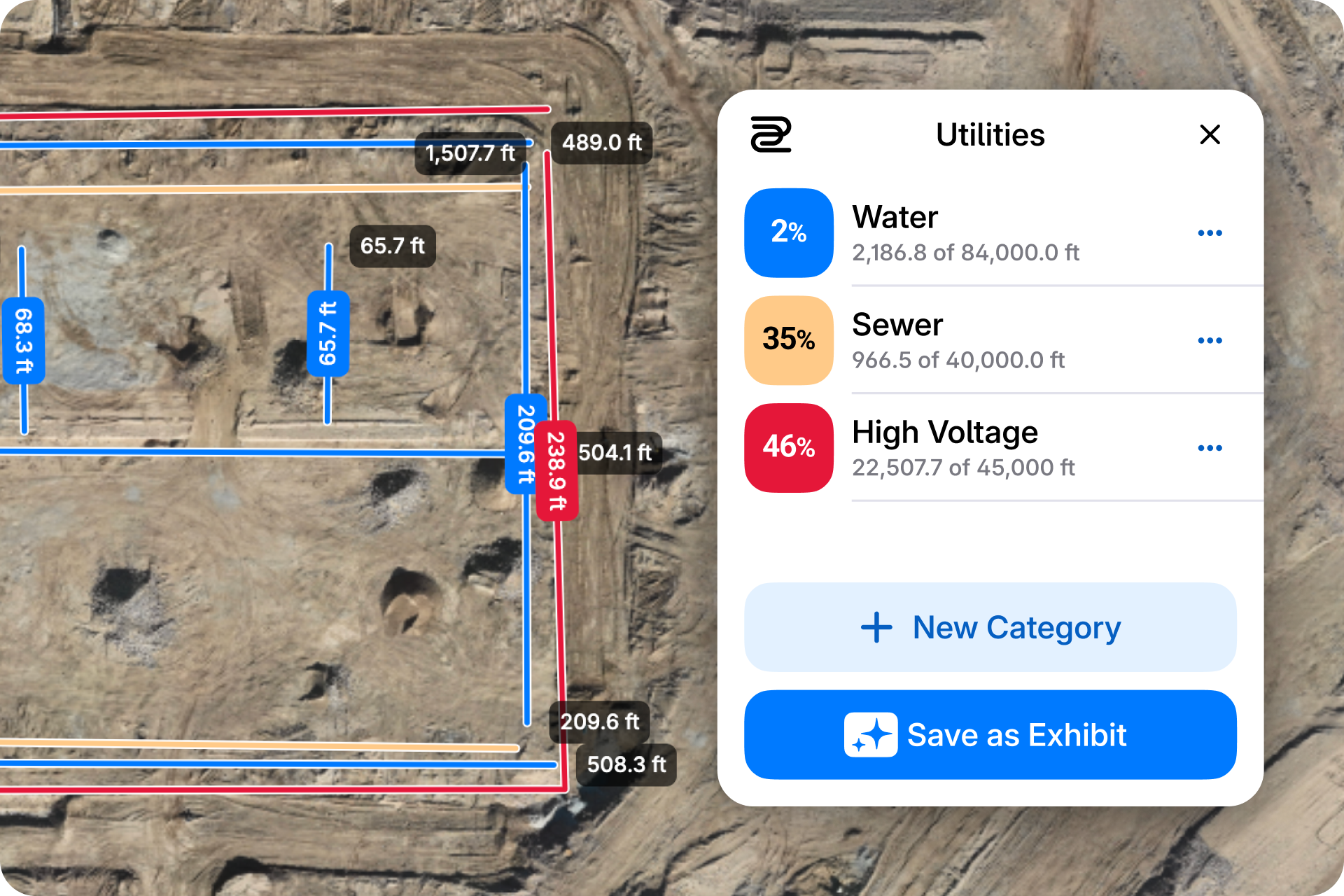
  • ​​Overlay Construction Drawings: Upload and overlay construction drawings directly onto the platform, allowing teams to visualize real progress in relation to the original plan. Homebuilders can trace installed utilities over the drawings to ensure everything is aligned with design specifications.
  • Dynamic Progress Updates: After each new scan, simply trace the newly installed utilities, and the tool will instantly recalculate totals and percentages. This ensures you have precise, up-to-date data at your fingertips—no manual recalculations needed.
  • Customizable Visuals: Assign colors to utility categories for clear differentiation and better collaboration.
  • Enhanced Accuracy: Automated calculations reduce errors, ensuring precise data for better decision-making.
  • Improved Project Visibility: Quickly identify bottlenecks, track progress, and provide clear, up-to-date visuals for meetings, ensuring stakeholders can easily understand the current status of the project. This level of project visibility is especially valuable when managing multiple projects at different stages, helping teams make informed decisions and stay aligned across various workflows.
67a0df958224d7ce41dc784f_67a0df8d0fb07b29531f344b_Katlynn Larrimores Video - Feb 3, 2025-VEED

How It Works

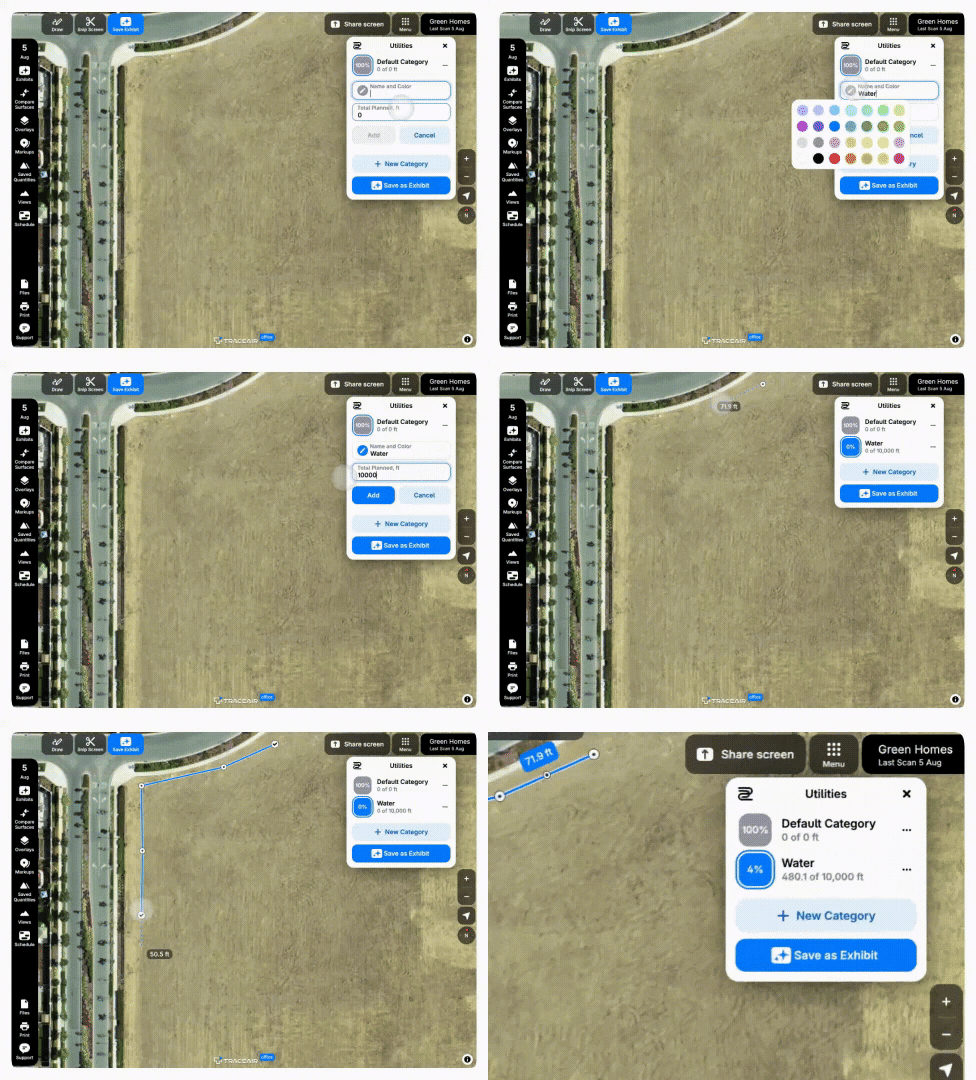
The Utility Tracking Tool streamlines progress tracking with just a few simple steps:

  1. Overlay Drawings: Upload construction drawings and overlay them on the site to ensure utilities are being installed as planned.
  2. Input Total Utility Length: Enter the required footage for each utility type.
  3. Trace Installed Segments: After each new site scan, trace the segments that have been installed.
  4. Visualize Progress: The tool calculates updated measurements and percentages, generating a color-coded map that highlights completed footage and what remains.
  5. Collaborate Seamlessly: Share updates effortlessly with your team using customizable visuals and hide/unhide functionality for specific utility types.

Experience the Difference Today‍

Utility installation tracking doesn’t have to be a headache. With our new Utility Tracking Tool, you’ll save time, reduce effort, and keep your projects on schedule and under budget. Ready to transform your workflow? Contact your TraceAir account manager or schedule a demo to see Utility Tracking in action!
3 min read

Empowering Texas MUDs Developers: The TraceAir Advantage

According to the U.S. Census, Texas was the fastest growing state in 2023, welcoming 473,453 new residents. This population surge reflects the...

Read More
Customer Story: Century Communities Puts Dirt to Good Use

4 min read

Customer Story: Century Communities Puts Dirt to Good Use

For most homebuilders, extra dirt equals extra problems. Exporting dirt is not only time-consuming, but also expensive. 500,000 cubic yards of...

Read More
Power-On Faster: How California Builders Beat Utility Energization Delays

2 min read

Power-On Faster: How California Builders Beat Utility Energization Delays

The houses are framed, trimmed, and cleaned. Driveways are in. Buyers are circling. And then everything stops—because the meters aren’t hot. In...

Read More