


For anyone in the homebuilding industry, time is one of your most valuable assets. The need to survey your lots multiple times is very time-consuming.
If you’re a land development or project manager, you know this story all too well:
You get a call from the contractor letting you know they’ve finished grading the lots. Next, you call the surveying company to schedule them out to survey the lots. Typically, there is a several-week delay until they can make it out to your project. When they are finally able to make it out to conduct the survey, they find several of the lots are off grade. Not only do you have to pay the surveyor for this inspection, but you now must also call the contractor to share the bad news.
After going back and forth with the contractor who claims they’ve already completed the job, they face the facts of the survey results and agree to come back and reevaluate the lots. At this point, the contractor has most likely moved on to another project, taking their machinery with them. Returning back to your project could take weeks and come with major costs, change orders, and damaged relationships. After they are done, you restart the process hoping all of the lots are on grade this time.
Time wasted, money wasted, hurt relationships... there has to be a better way!
Meet Lot Viewer
Our newest tool, Lot Viewer enables you to check the grade of your lots like never before — with just a few clicks.
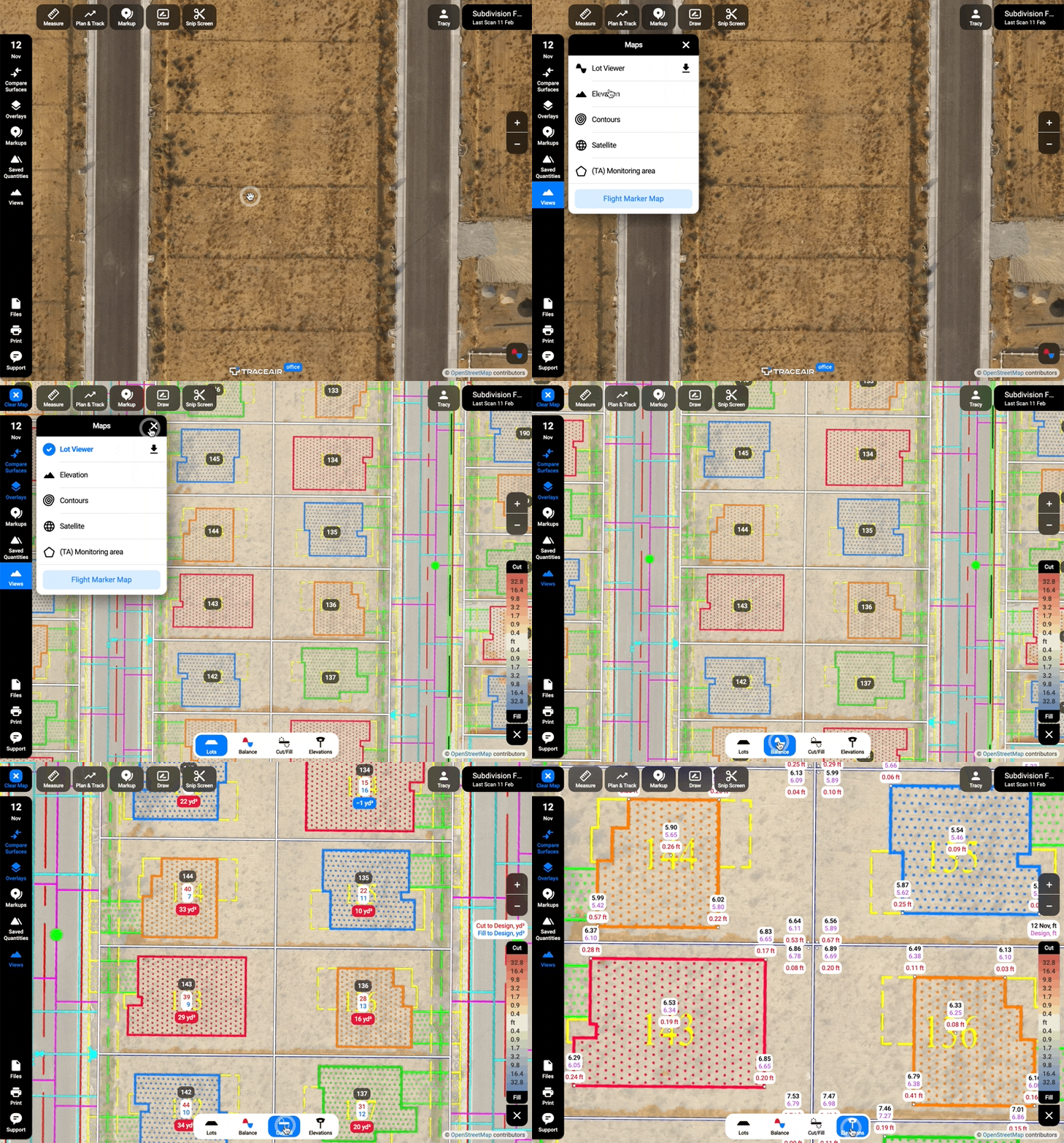
Lot Viewer breaks up your project into individual lots and calculates cut/fill balance and elevations. It then compares these elevations to the design grade and creates a report. This data is updated per lot with every new scan. Users can easily verify the final grading of lots and building pads prior to having them surveyed. Lot Viewer is also a great tool for checking progress. Select previous scans to view historical data and compare to current data.
Lots
View the lines of individual lots. Track the grading progress between the scans by changing the scan date.
Balance
View the total cut/fill balance of each lot.
Cut/Fill
Cut and fill volumes are measured for the entire lot area compared to the Design Grade.
Elevation
Elevations are measured at all four corners of the lot, the building pad, and the center, showing the actual scanned Elevation, Design Grade, and the difference between them.
Get Started
To get an in-depth demonstration or to activate Lot Viewer on your projects, request a demo.